TL;DR
- I built
sc, a command line tool for Solace Cloud, so I could script brokers and their configuration the same way I script AWS, Azure or GCP.- Don’t write CLI plumbing yourself. A framework like oclif (the one behind the Salesforce and Heroku CLIs) handles parsing, help, docs and packaging so you only write the business logic.
sc account loginstores API tokens with AES-256-GCM, using a master key kept in the OS keychain and bound to your machine, and lets you work with several orgs and brokers at once.- A plugin architecture keeps a big command surface manageable: shared code lives in a core library, and broker commands live in a plugin you can even use against brokers outside Solace Cloud.
- AI coding assistants changed my pace: a new command and its tests now take minutes, not evenings.
Every cloud I use has a command line tool. When I want a VM in AWS, a storage account in Azure or a bucket in GCP, I reach for aws, az or gcloud, and once I’ve run the command by hand it goes straight into a script. Back in May 2025 I wanted the same thing for Solace Cloud: create brokers, configure queues and client profiles, and tear it all down again, without clicking through a console or hand-crafting REST calls.
So I built one. It’s now the Solace Cloud CLI in Solace Labs, and the binary is simply sc. This post is the story of how it came together and the decisions I’d make again.
Don’t build the plumbing
The interesting part of a CLI is what each command does. The boring part is everything around it: parsing arguments and flags, validating them, printing help, generating docs, handling errors consistently, and shipping something people can install. I didn’t want to spend my evenings on the boring part.
I went looking for a CLI framework and landed on oclif, the Open CLI Framework. It comes from Salesforce and powers both the Salesforce CLI and the Heroku CLI, which thousands of developers use every day. My reasoning was simple: if it holds up for them, it will hold up for me.
It did. With oclif, a command is a class. You declare its flags and arguments, write a run() method with your logic, and the framework does the rest: parsing, --help output, a generated README, autocomplete and the build that publishes to npm. Adding a command became “write the logic, write the test” rather than “wire up another parser”.
From hand-written commands to minutes with AI
The first few commands I wrote entirely by hand, and you can tell if you look at the early history. Each one took a while: read the Solace Cloud API docs, model the request, map flags to fields, format the output, write tests.
Then I started using AI coding assistants, mostly Claude Code, and the pace changed. Because oclif gives every command the same shape, an assistant has a clear pattern to follow. I can point it at an existing command and the API spec for a new endpoint, and get a working command with test cases in a matter of minutes. My job shifted to reviewing, tightening the naming, and making sure the behaviour is what a user would expect.
Logging in, properly
My first versions read the Solace Cloud API token from an environment variable. That works for a quick demo but gets awkward fast. You end up with tokens sitting in shell profiles, and switching between orgs means juggling variables.
With Claude Code’s help I added proper login commands. You log in once per org:
sc account login --org <Your Org Name> --set-default
The CLI prompts for the token and stores it in ~/.sc/orgs.json, encrypted with AES-256-GCM. The encryption key isn’t in that file. The CLI generates a random master key, keeps it in your operating system’s keychain (Keychain on macOS, Credential Manager on Windows, libsecret on Linux) and combines it with the machine ID. Copy orgs.json to another machine and it’s useless, so a stolen file doesn’t hand over your token. The authentication docs have the details.
The bigger win was being able to stay logged in to several things at once: multiple Solace Cloud orgs, and multiple brokers. Each command can say which org or broker it targets, and if it doesn’t, it uses the default. That one change can make scripting across dev, test and prod environments far less error-prone.
The command list problem
Then came the realisation that the command list was going to be huge. Solace Cloud has several components, each component has many features, and each feature needs create, update, display, list and delete commands. Multiply that out and you’re looking at hundreds of commands.
Not everyone needs all of them, either. Someone who only manages broker configuration doesn’t want a CLI stuffed with platform administration commands they will never run.
This is where oclif really earned its place. It has a plugin architecture: you can build smaller CLIs as plugins and either bundle them with the main CLI or let users install them on demand.
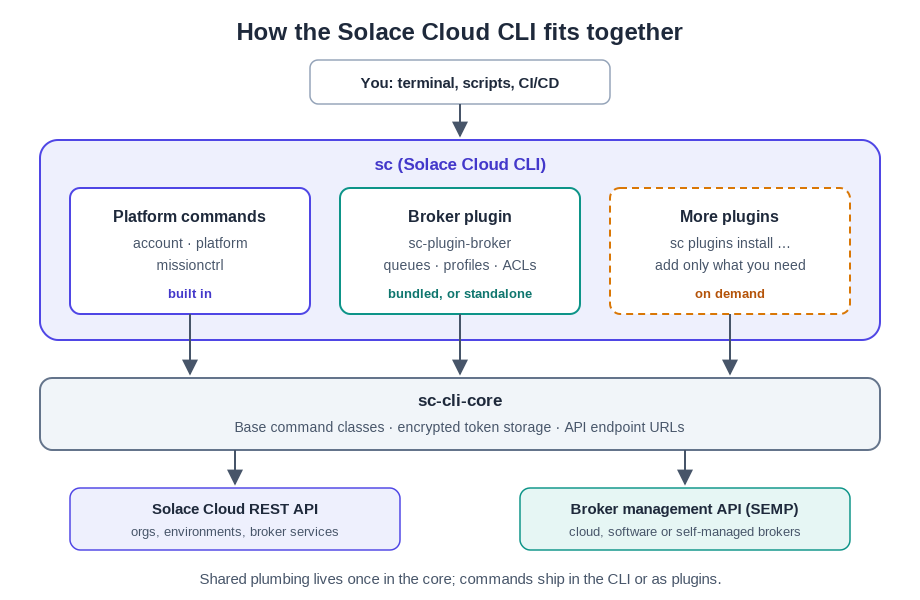
I split things up in two steps:
- A core library. Everything every command needs went into sc-cli-core: base command classes, token encryption and storage, and API endpoint URL management. Plugins depend on it, so a new plugin starts with login, config and API access already working.
- A broker plugin. Commands that act on an event broker itself (queues, client profiles, ACL profiles, client usernames and so on) moved to sc-plugin-broker, separate from the Solace Cloud platform commands.
That second split had a bonus I hadn’t planned for. Because broker commands talk to the broker’s management API rather than to Solace Cloud, the plugin works on its own. I can use it to manage a software broker on my laptop or a self-managed broker that has nothing to do with Solace Cloud.
Are CLIs still worth it?
If you’re reading this in late 2026 or beyond, you might reasonably ask whether a CLI still matters. MCP servers are spreading quickly, and more and more of how we interact with systems is moving to natural language through AI agents.
My take, as I write this: CLIs are still very much relevant. They are scriptable, predictable and easy to drop into a CI/CD pipeline, and they make a great foundation for agents too, since an agent that can run a well-documented command is an agent that can get real work done. Who knows what the next few years bring, but I don’t see the terminal going anywhere soon.
Wrapping up
If you still love a good CLI, give it a try:
npm install -g @dishantlangayan/solace-cloud-cli
sc account login --org <Your Org Name> --set-default
sc platform env list
sc commands
You’ll need Node.js 20 or later and a Solace Cloud API token. The fast track guide walks through it step by step, and the repo is open for issues and ideas. If you’re new to event brokers, my post on Solace event broker terminology explains the queues, client profiles and ACL profiles these commands manage.