TL;DR
- A message VPN is a virtual broker inside a broker. Clients log in to one with a client username, which points to a client profile (what it can do) and an ACL profile (what it can reach).
- Topics are hierarchical strings on each message. Topic subscriptions with
*,>and!decide who gets what.- Queues store guaranteed messages until they’re acknowledged. TTL, dead message queues and replay handle the messages that expire, fail or need a second run.
- Solace event brokers come as appliances, software and managed event broker services, and they join into an event mesh with DMR or message VPN bridges.
- The table below has a one-liner for every term. Each term links to a diagram and the few points worth remembering.
In the last post I covered the vendor-neutral vocabulary of event-driven architecture. In this post I’ll cover some Solace Event Broker-specfic ones, and is a glossary of key terms that I believe anyone using Solace should know about. This is not a how-to post and I won’t go deep on how each feature works.
All the terms at a glance
| Area | Term | In one line |
|---|---|---|
| Brokers and tenancy | Appliance | Purpose-built hardware event broker for the highest throughput and lowest latency. |
| Software event broker | The event broker as software you run yourself, in containers or VMs, in any cloud or on-prem. | |
| Event broker service | A Solace event broker that Solace runs for you, created and managed in Solace Cloud. | |
| Message VPN | A virtual broker inside a broker, with its own clients, topics, queues and settings. | |
| Clients and access | Client username | The identity an application uses to log in to a message VPN. |
| Client profile | A reusable set of connection and resource settings for client usernames. | |
| ACL profile | A reusable set of rules for where clients can connect from and which topics they can publish and subscribe to. | |
| OBO subscription manager | A trusted client allowed to add and remove subscriptions on behalf of other clients. | |
| Topics | Topic | A hierarchical string on every message that describes it and drives routing. |
| Topic subscription | A topic filter a client or queue registers to attract matching messages. | |
| Wildcards | *, > and ! in subscriptions, to match many topics at once or exclude some. |
|
| Delivery and storage | Direct and guaranteed messaging | The two delivery modes: fast and best-effort, or persisted and acknowledged. |
| Queue | A durable endpoint that stores guaranteed messages until a consumer acknowledges them. | |
| Topic endpoint | An endpoint with exactly one topic subscription, built for JMS durable subscribers. | |
| Time-to-live (TTL) | How long a message may wait on an endpoint before it expires. | |
| Dead message queue (DMQ) | A queue that catches messages that expired or couldn’t be delivered. | |
| Message replay | Redelivering guaranteed messages from a log, from a point in time you choose. | |
| Connecting brokers | Event mesh | A network of connected event brokers that routes events as if it were one. |
| Dynamic Message Routing (DMR) | Solace’s way to link brokers into an event mesh, with subscriptions shared automatically. | |
| Multi-Node Routing (MNR) | An older way to link brokers, for direct messages only. | |
| Message VPN bridge | A configured link between two message VPNs that carries only the topics you choose. |
The terms, one picture each
Event broker form factors
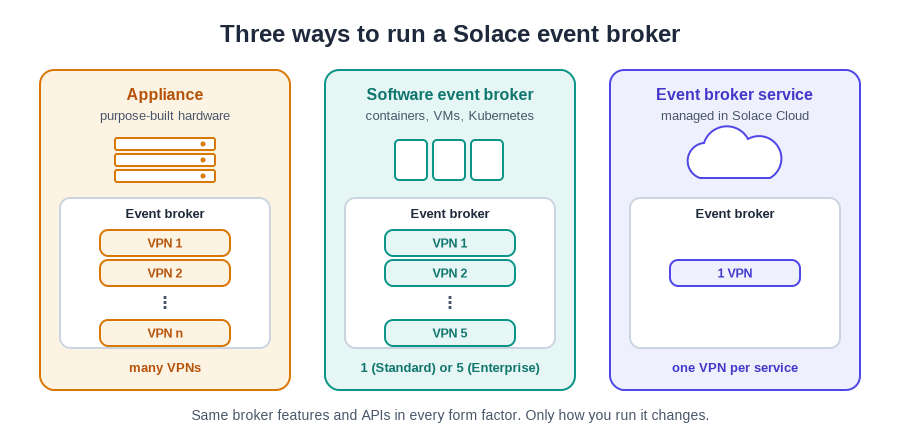
The broker is the same in every form factor: same features, same APIs, same protocols. What changes is who runs it and how many message VPNs it holds.
Appliance
- Purpose-built hardware (the Solace 3530 and 3560) that uses FPGAs and network processors to move messages in hardware.
- Built for very high throughput with low, predictable latency.
- Holds many message VPNs, which makes it a natural base for a shared, multi-tenant messaging platform.
- Redundant by design, with separate data and control planes, field-serviceable power supplies, internal solid-state disks, and replication to a standby site.
Software event broker
- The same broker as an appliance, but shipped as container and machine images for any cloud or your own data centre.
- Standard edition is free with one message VPN. Enterprise edition is built for production scale and allows up to five.
- You run it: install, upgrade, size the scaling parameters, and set up high availability.
- A good fit when you need the broker close to your apps, or in an environment you fully control.
Event broker service
- Solace runs the broker for you, handling deployment, upgrades, patching and operations.
- You create and manage services from Mission Control in Solace Cloud. They can run in Solace-managed clusters on the public clouds, in your own VPC, or on-premises.
- Each service has exactly one message VPN. Where you’d add a VPN to a self-managed broker, you add another service instead.
- Size is set by the service class you pick. Choose it based on connections, queues and throughput, not just today’s traffic.
Message VPN
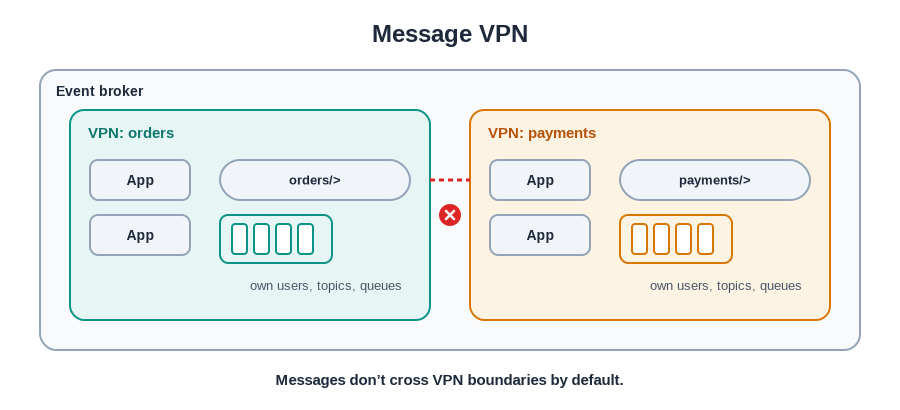
- A message VPN separates topic space and clients. A message published in one VPN only reaches clients in that same VPN.
- It’s how one broker serves many teams, applications or environments (multi-tenancy). Each VPN has its own users, settings and limits.
- A connection belongs to one VPN. To use another, the client has to another separate connection.
- Self-managed brokers have a VPN called
defaultthat can’t be deleted. Messages cross VPN boundaries only through a bridge or DMR. - It has nothing to do with a network VPN. No tunnels or IPsec involved.
Client username
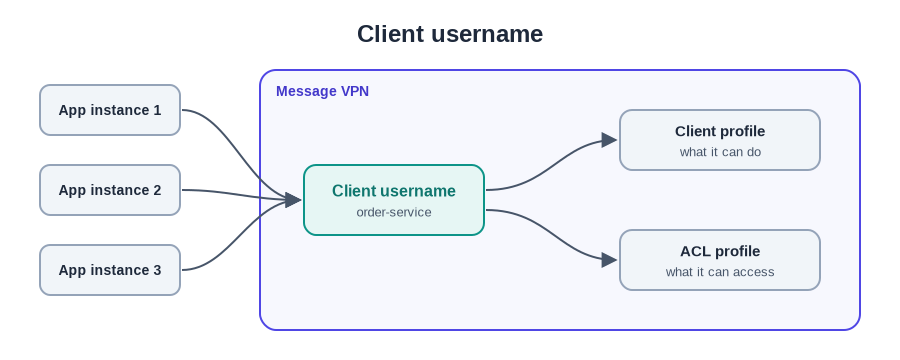
- A client username belongs to one message VPN. The same name in two VPNs is two different usernames.
- Many connections can share one username, so you can scale an application out without touching broker config.
- It must be enabled to log in. Disabling it disconnects every client using it, which is handy in an emergency.
- Every username points to exactly one client profile and one ACL profile.
- Each VPN has a
defaultusername, disabled by default. It’s used when a client logs in with a username that doesn’t exist, which can be useful with external authentication. Keep it off unless you mean it.
Client profile
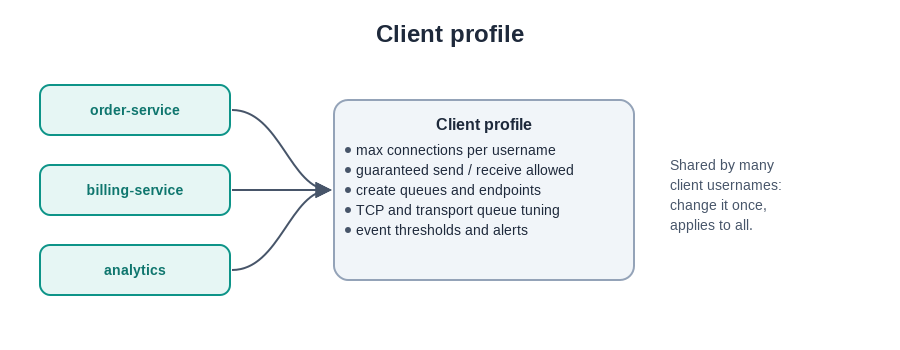
- A client profile sets what connected clients can do and how many resources they get. It’s shared by any number of usernames in the VPN.
- Typical settings: maximum connections per username, whether clients may send and receive guaranteed messages, whether they may create queues, TCP tuning and event thresholds.
- Every VPN has a
defaultclient profile that can’t be deleted. New usernames start on it. - If you delete a profile, its usernames fall back to
default. Create descriptive profiles of your own and keepdefaultrestrictive.
ACL profile
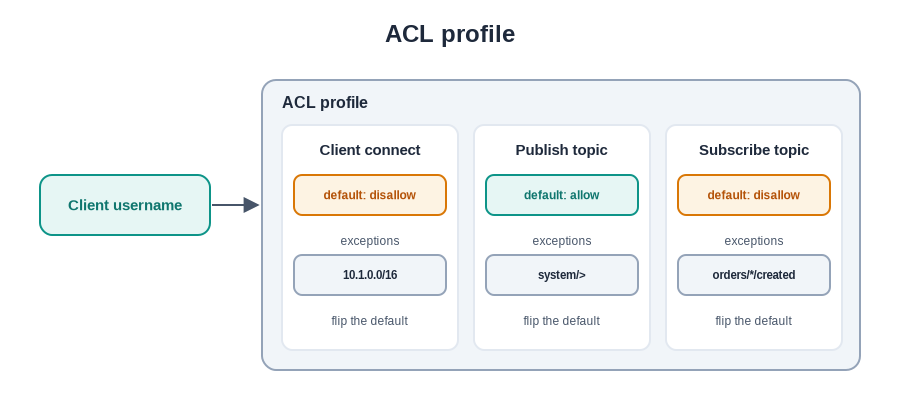
- An ACL profile sets what clients can reach: which IP addresses may connect, and which topics they may publish and subscribe to.
- Each list has a default action (allow or disallow) plus exceptions that flip it. Topic exceptions can use wildcards.
- Every VPN has a
defaultACL profile that allows everything, and usernames fall back to it if their profile is deleted. If you use ACLs at all, lock it down. - How usernames, client profiles and ACL profiles work together is a post of its own when I find some time to write about it.
OBO subscription manager
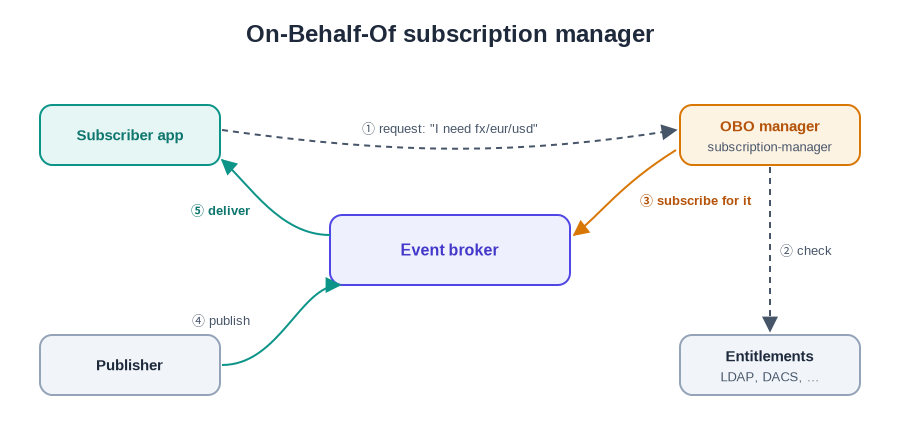
- An On-Behalf-Of (OBO) subscription manager is your own application, connected with a client username that has the subscription manager option enabled.
- It can add and remove direct messaging subscriptions for other clients in the same VPN. It’s still limited by its own ACL profile.
- Typical reasons: entitlements already live in an external system (common in market data), you need a central audit trail of who subscribed to what, or subscription sets change too often for static ACLs.
- It becomes critical infrastructure. Run more than one instance and make sure it reapplies subscriptions after a reconnect.
Topic
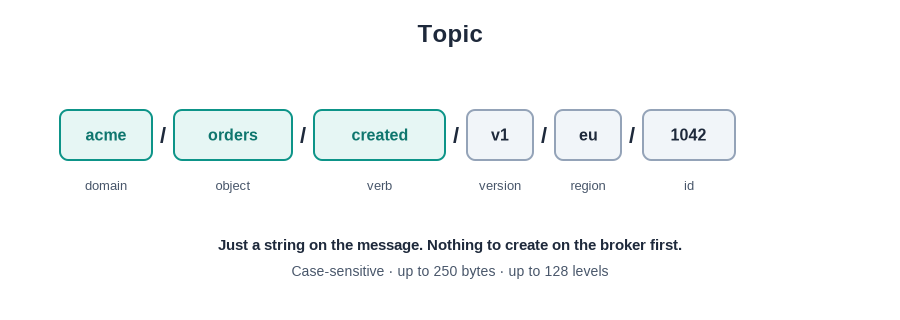
- A topic is metadata on each message: levels separated by
/, describing what the event is. - There’s nothing to create on the broker first. Publish to a topic and the broker routes it to any matching subscription.
- Topics are case-sensitive, up to 250 bytes and up to 128 levels.
- Put general levels first and specific ones last, such as domain, then object, then verb, then IDs. A good topic taxonomy is what makes fine-grained subscriptions possible later. Solace’s Topic Architecture Best Practices is the guide to follow.
- Don’t use
*,>or a leading!in topics you publish. They only act as wildcards in subscriptions.
Topic subscription
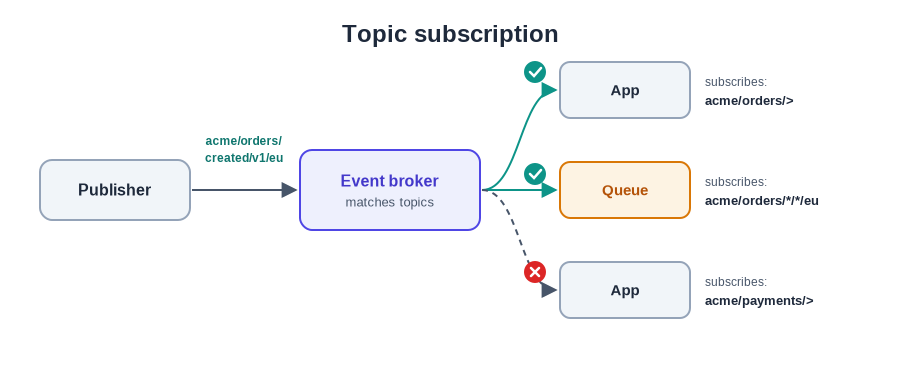
- A topic subscription is a filter. Any message whose topic matches is delivered to whoever holds the subscription.
- A connected client holds subscriptions for direct messages. A queue holds subscriptions to attract and store guaranteed messages.
- The broker does the matching on every publish, so publishers never need to know who’s subscribed.
- A client’s subscriptions last as long as its session. A queue’s subscriptions last as long as the queue.
- There’s a lot more to say about matching and design. How Topic Subscriptions Work in Solace is coming soon.
Wildcards
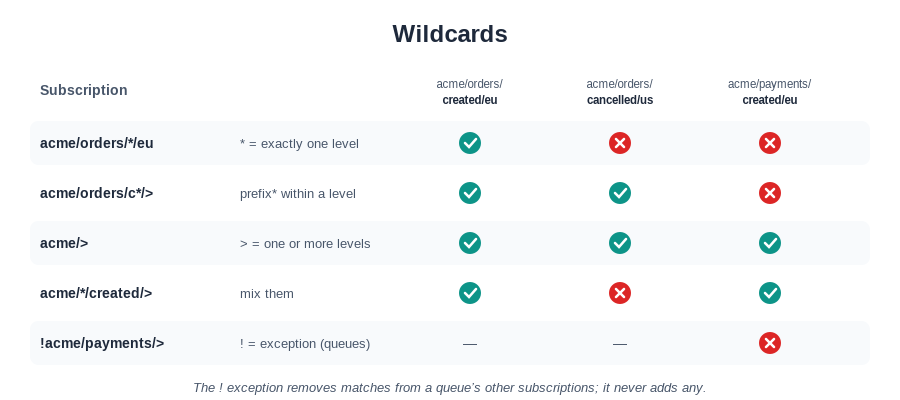
*matches exactly one level. After a prefix, such asc*, it matches any level that starts with that prefix.>at the end of a subscription matches one or more remaining levels.!at the start marks a subscription exception on a queue. It removes matches from the queue’s other subscriptions.- Wildcards only work in subscriptions (and ACL exceptions), never in published topics.
- MQTT clients use their own
+and#, and the broker handles the translation.
Direct and guaranteed messaging
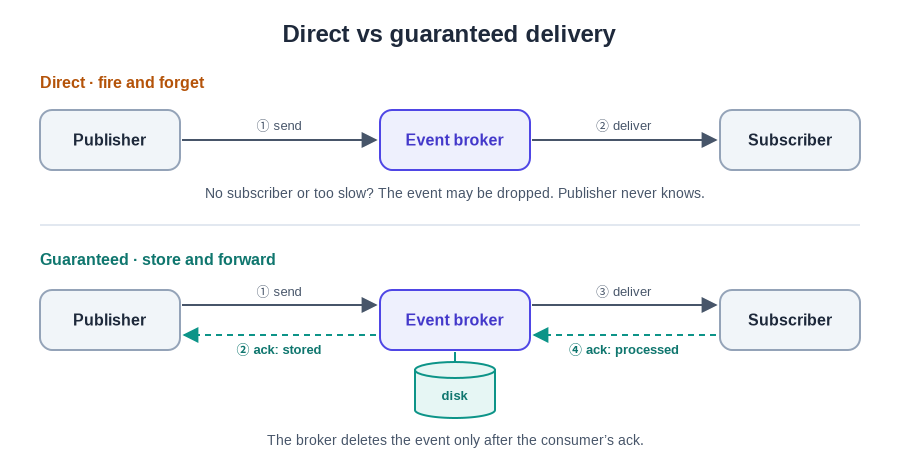
- Direct messages are never stored. They give the lowest latency and highest throughput, but they can be dropped if nobody is subscribed or a consumer falls behind.
- Guaranteed messages are written to the broker’s message spool and acknowledged to the publisher. They’re removed only when every consuming endpoint has its acknowledgement.
- Guaranteed messages need an endpoint to land in, either a queue or a topic endpoint.
- The publisher picks the mode per message, and it’s preserved as messages cross an event mesh.
- The previous post walks through both flows step by step.
Queue
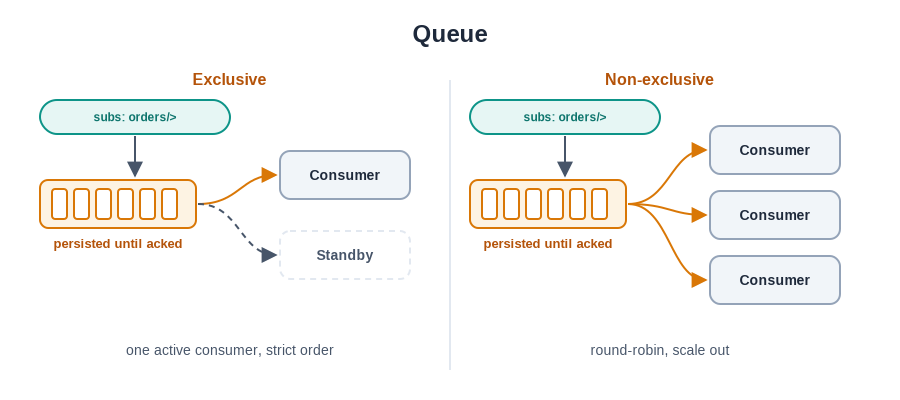
- A queue stores guaranteed messages until a consumer acknowledges them. It survives broker restarts and consumer crashes.
- It attracts messages through topic subscriptions (the recommended way) or when a publisher sends to the queue by name.
- Exclusive queues deliver to one active consumer at a time, with others on standby. That gives you ordering and failover. Non-exclusive queues spread messages across consumers to scale out.
- Partitioned queues give you both scale and ordering per key.
- Durable queues are created by an admin or the app and outlive the client. Temporary queues live and die with the client that created them.
Topic endpoint
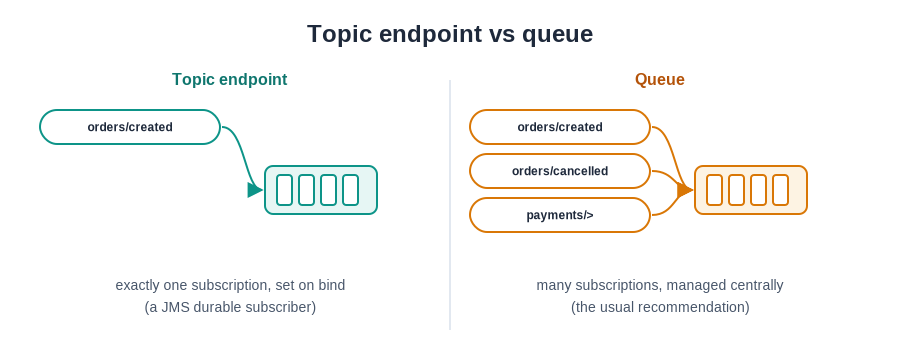
- A topic endpoint stores guaranteed messages like a queue, but it holds exactly one topic subscription, set by the consumer when it binds.
- It exists mainly to back JMS durable topic subscribers. Do not use it othewise.
- It offers fewer options than a queue. For most new designs, a queue with topic subscriptions is the better fit.
- Like queues, durable topic endpoints can be exclusive or non-exclusive.
Time-to-live (TTL)
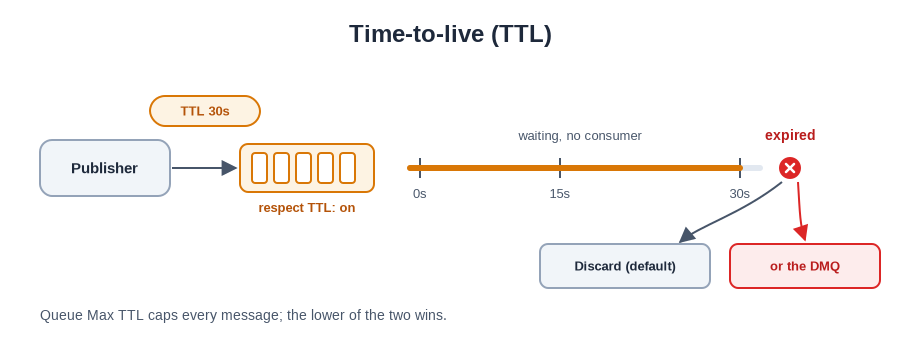
- The publisher can set a TTL on each message, in milliseconds.
- An endpoint only enforces it when Respect TTL is enabled on that queue or topic endpoint.
- An endpoint can also set a Max TTL for every message it stores. If both are set, the lower one wins.
- Expired messages are deleted by default, or moved to a DMQ if one is configured.
- Use TTL for data that goes stale, such as prices or one-time notifications. Don’t use it to hide a consumer that can’t keep up.
Dead message queue (DMQ)
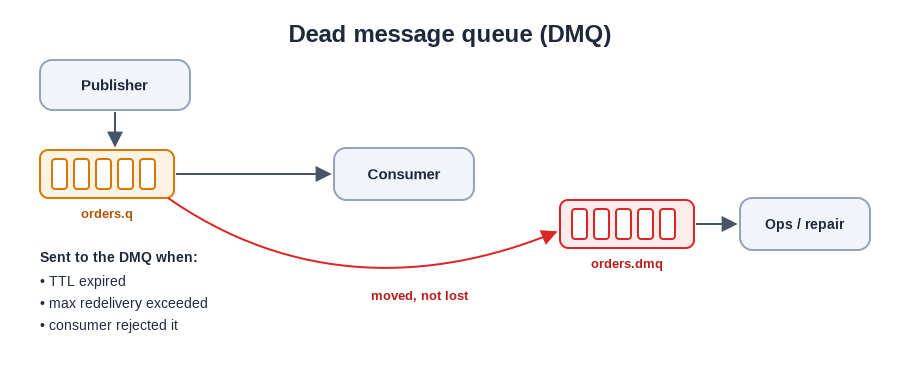
- A DMQ is an ordinary queue that another endpoint names as its dead message queue. The default name is
#DEAD_MSG_QUEUE. - Messages land there when their TTL expires, when redelivery attempts exceed the endpoint’s Max Redelivery, or when the consumer rejects them.
- Publishers can mark messages as DMQ-eligible. How the broker uses that flag depends on endpoint settings and broker version, so check yours.
- Prefer one DMQ per queue, and keep something consuming it. Otherwise it quietly fills the message spool.
Message replay
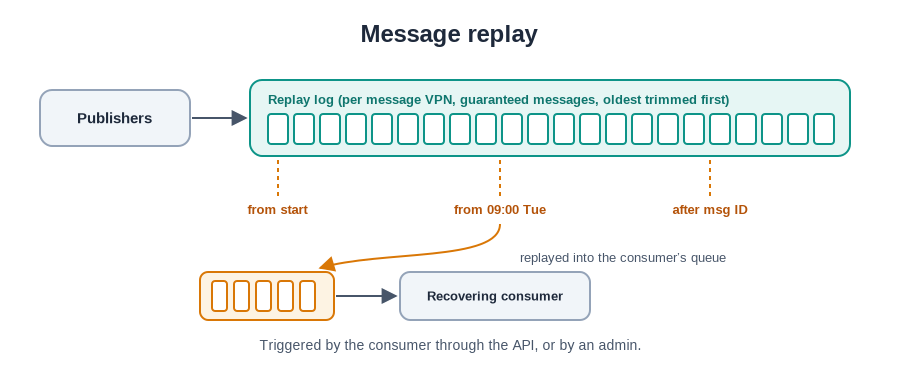
- Message replay keeps a replay log of guaranteed messages per message VPN. You can filter which topics are logged.
- A replay starts from the beginning of the log, from a date and time, or after a specific message ID.
- The consuming app can request it through the API, or an admin can start it.
- Messages are replayed only to the endpoint that asked, so other consumers aren’t affected.
- The log has a size limit and the oldest messages are trimmed first. Size it for the recovery window you actually need.
Event mesh
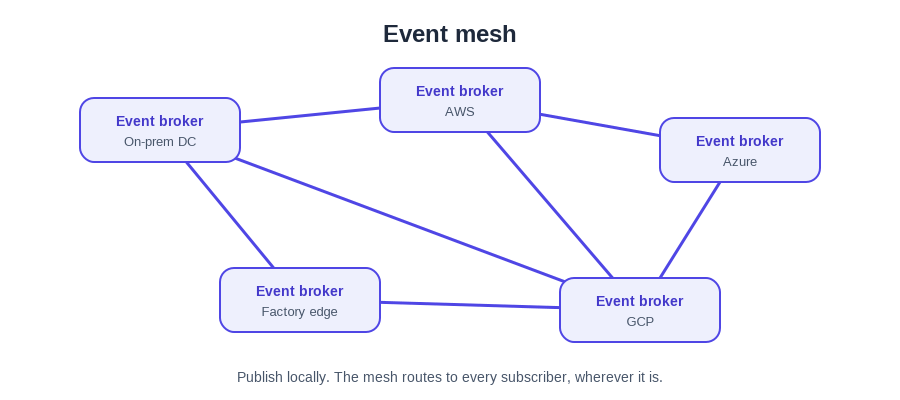
- An event mesh is a network of event brokers and event broker services that routes events between applications, wherever they run.
- Apps connect to their local broker. Events cross to other sites only when someone there has subscribed.
- In Solace you build one with DMR, and sometimes with bridges. You can set it up from Mission Control.
- I covered the idea in more depth in Event Brokers and the Event Mesh, Explained.
Dynamic Message Routing (DMR)
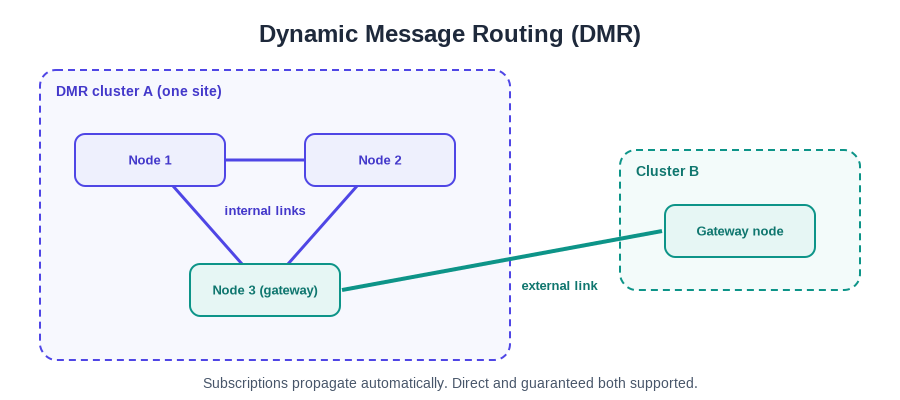
- DMR groups brokers at one site into a cluster joined by internal links. Clusters connect through gateway nodes over external links.
- Subscriptions spread across the mesh automatically, so events find consumers without per-topic config. Export filters can restrict what crosses.
- It carries both direct and guaranteed messages and keeps the publisher’s delivery mode.
- Event broker services in Solace Cloud are usually single-node clusters.
- Don’t run DMR and a bridge between the same brokers, or you’ll get duplicate messages.
Multi-Node Routing (MNR)
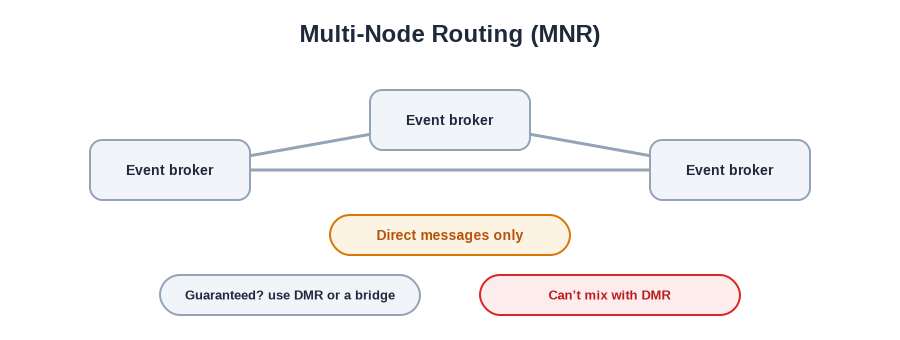
- MNR links brokers so direct messages published on one reach subscribers on another.
- It’s designed only for direct messaging. For guaranteed messages you need DMR or a bridge.
- It can’t be combined with DMR, and DMR mode is enabled on brokers by default.
- You’ll mostly meet it in long-running direct-messaging deployments. For new designs I’d reach for DMR.
Message VPN bridge
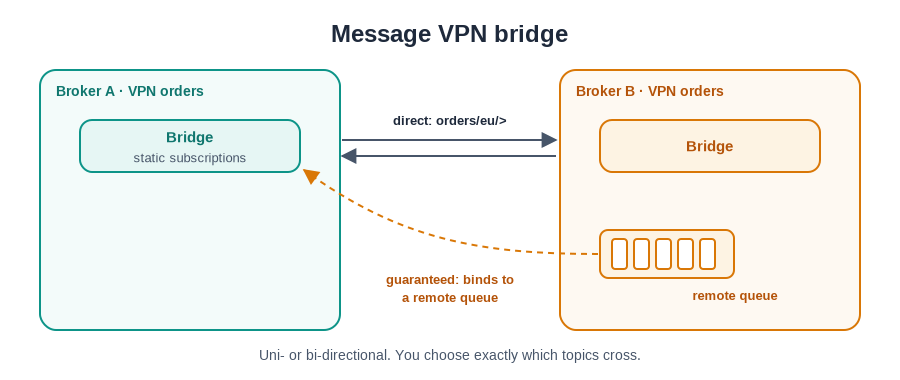
- A message VPN bridge links two VPNs, on the same broker or on different brokers.
- Direct messages cross based on topic subscriptions you configure on the bridge. Guaranteed messages cross when the bridge consumes from a queue on the remote side.
- It can be one-way or two-way, and loops are prevented automatically.
- In Solace Cloud a bridge always joins two services, since each has only one VPN.
- Pick a bridge when you want strict control over exactly what crosses, and DMR when you want a large mesh with minimal config.
Wrapping up
That’s the glossary: twenty-one terms, one picture each. If you’re new to Solace, the five to get comfortable with first are message VPN, client username, topic, topic subscription and queue. Almost everything else builds on them.